Here is a step-by-step guide how to enable bank transfer payment option for specific users/customers using YITH Payment Method Restrictions plugin.
BACS (Bank Transfer) in WooCommerce allows customers to pay manually via bank transfer. This payment option is often used for B2B (Business to Business).
1. Create a role in WooCommerce.
You can create a role your theme’s functions.php or a plugin. I prefer to add code via a plugin, like Code Snippets.
This is the code to create a role namne Bank Transfer Allowed.
function add_bank_transfer_role() {
    add_role(
        'bank_transfer_allowed', // Role slug
        'Bank Transfer Allowed', // Display name
        [
            'read' => true,
            'level_0' => true
        ]
    );
}
add_action('init', 'add_bank_transfer_role');
2. Assign the role to the users you want to show the bank transfer payment option for.
Go to WordPress Admin → Users. Edit a user. Select role: Bank Transfer Allowed.
3. Make sure you have bank transfer enabled in WooCommerce.
Go to WordPress Admin → WooComerce → Payments → Take offline payments
Enable Direct bank transfer. Make sure to add your correct account details, write a description and instructions.
4. Configure YITH Payment Method Restrictions for WooCommerce.
Create a new Payment Method Restrictions Rule in the YITH Payment Method Restrictions plugin.
Selected bank transfer as payment method gateway.
Selected remove payment method.
Conditions:
Role
Does not contain
Bank Transfer Allowed
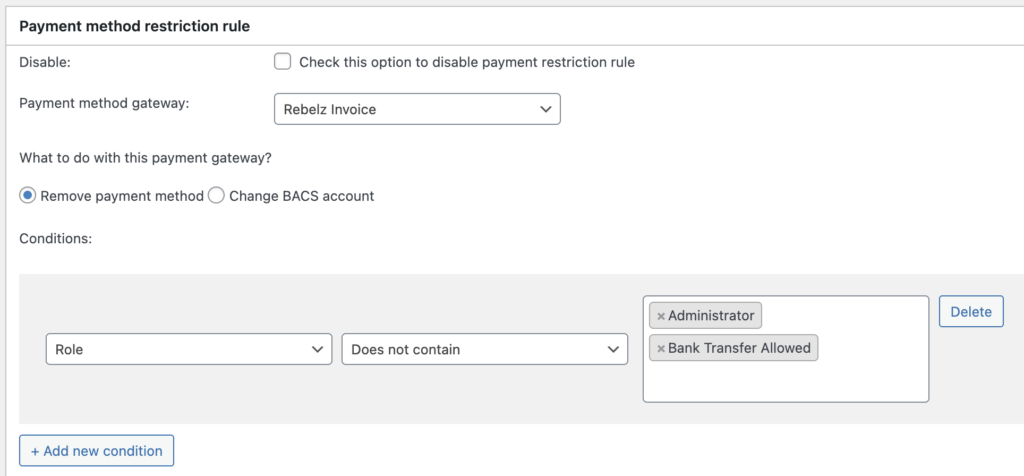
I like to add Administrator to the conditions as well so it’s easy for me to test how in looks I the checkout.
Now you can test and see how it looks in the checkout. If the user loged in is a member of the role Bank Transfer Allowed or Administrator the payment option Bank Transfer is available in the checkout.
Leave a Reply